
PenReader2.0.11 - Google Play
You'll be able to see results in few seconds.
Publisher Description


Multilingual handwriting recognition software
Write on your screen as with a pen on a paper!
PenReader, the multilanguage app to recognize handwriting, will convert any handwritten text into a print form of the highest accuracy within seconds.
_ _ _
PenReader as a handwriting recognition technology started in 1968. While you are writing with a finger tip on a touchscreen surface, PenReader analyzes coordinates of your finger movements and converts the data into print characters by performing tens of thousands of calculations per second. Ensuring the shortest possible delay and highest accuracy, PenReader is the top tool to convert a handwritten text into a print one.
_ _ _
PenReader offers powerful options:
• New! Try the easy input into your small screen device (e.g. a phone):
- ‘Letter-on-letter’ mode is specifically developed for small screens. You can input an entire word by drawing letters on top of each other. As a result, the characters are recognized as one word.
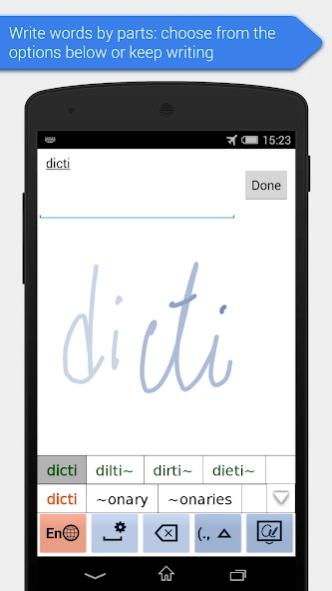
- ‘Write words by parts’ feature allows you to input a part of a word, then PenReader will guess a possible extension and offer options to continue.
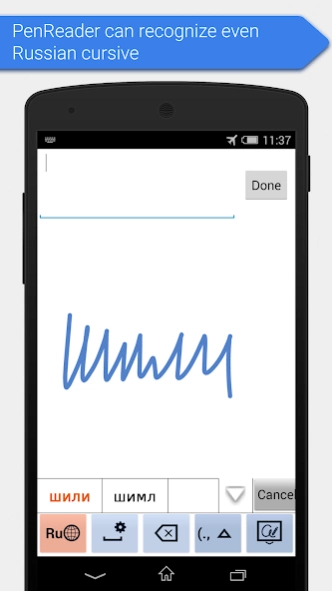
• A quicker and more accurate recognition of words is put into practice owing to the improved engine capabilities for 38 languages: Russian, English, German, French, Spanish, Norwegian, Czech, Polish, Hungarian, Slovenian, Slovak, Turkish, Croatian, Dutch, Estonian, Finnish, Italian, Latvian, Lithuanian, Portuguese, Swedish, Greek, Hebrew, Romanian, Albanian, Icelandic, Catalan, Bulgarian, Arabic, Danish, Georgian, Belorussian, Welsh, Esperanto, Kazakh, Maltese, Serbian, Ukrainian.
• Save your own words in the User dictionary: any word which has been input by you and has not been found in the dictionary will be automatically added to the User dictionary after you tap this word in the hint field. This field, at the bottom of the screen, offers spelling options.
• New! Use the updated modes ‘Letter-by-letter’, ‘Cursive’, ‘Separate’, ‘Smart’ to increase the recognition accuracy.
• Spelling check helps avoid mistakes (words will be checked with the dictionary).
• Analysis of adjacent characters improves input accuracy in ‘Cursive’ and ‘Separate’ modes.
• Special symbols ($, @, &, etc.) are displayed on a screen keyboard from now on. Besides the main symbol, other symbols are accessible with a long tap.
• Have a need for arithmetic operations? Turn on ‘Calculator’ mode and write down the operations you need (*, -, +). When ‘=’ has been input, you will see the result in the input field.
• The settings are displayed in thematic groups, new descriptions below the titles and new parameters have been added.
• If you bought PenReader’s previous version for Android, then a new one will be available free for you! Use «I bought PenReader 1.x» to restore your purchase quickly.
• PenReader requires minimal storage capacity on your device and no additional languages to be downloaded.
• Integration with other apps: if you need to input a password, e-mail, text, numbers, etc. then PenReader switches temporarily into the ‘Separate’ mode and turns off spelling to make character input as easy as possible.
*****
About Paragon Software Group
Paragon Software Group is an international software developer focused on two markets: system utilities and mobile applications. Within its 20 years of history, the company is cooperating with corporate customers to address their needs of systems management and data security as well as producing mobile apps of handwriting recognition and dictionaries for individual users. More than 300 IT professionals, including over 100 software engineers, are creating products for you in Russia, Germany, the USA, Japan.
About PenReader
The company that develops PenReader is Paragon Software GmbH. The latest version released by its developer is 2.0.11.
To install PenReader on your Android device, just click the green Continue To App button above to start the installation process. The app is listed on our website since 2014-12-25 and was downloaded 0 times. We have already checked if the download link is safe, however for your own protection we recommend that you scan the downloaded app with your antivirus. Your antivirus may detect the PenReader as malware as malware if the download link to com.input.PenReaderInApp is broken.
How to install PenReader on your Android device:
- Click on the Continue To App button on our website. This will redirect you to Google Play.
- Once the PenReader is shown in the Google Play listing of your Android device, you can start its download and installation. Tap on the Install button located below the search bar and to the right of the app icon.
- A pop-up window with the permissions required by PenReader will be shown. Click on Accept to continue the process.
- PenReader will be downloaded onto your device, displaying a progress. Once the download completes, the installation will start and you'll get a notification after the installation is finished.
Program Details
System requirements
Download information
Pricing
Version History
version 2.0.11
posted on 2014-12-25
Disclaimer
Official Google Play Link
We do not host PenReader on our servers. We did not scan it for viruses, adware, spyware or other type of malware. This app is hosted by Google and passed their terms and conditions to be listed there. We recommend caution when installing it.
The Google Play link for PenReader is provided to you by apps112.com without any warranties, representations or guarantees of any kind, so access it at your own risk.
If you have questions regarding this particular app contact the publisher directly. For questions about the functionalities of apps112.com contact us.
